Gateway Configuration
This guide explains how to set up an Gateway Configuration using the Loft App.
⚠️ Note: To set up a Gateway Configuration, the device must already be installed. If don't know how to install a device so click here.
Watch The Video Tutorial
Steps to Setup Gateway Configuration
-
Open the Loft App
-
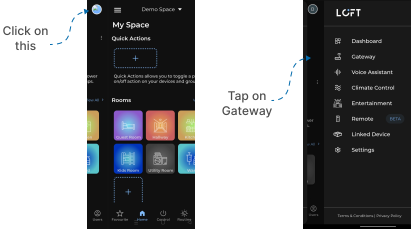
Go to Gateway Section
- Tap the side menu (hamburger icon) in the top-left corner.
- Select the Gateway option.
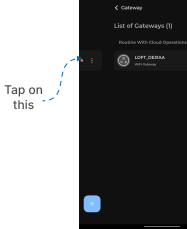
- Select Device in Gateway List
- Installed device will appear in the Gateway list.
- Tap on it to proceed.
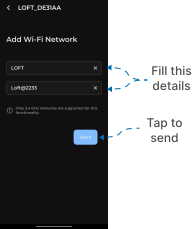
- Setup Network
- Add Wi-Fi network input screen appears.
- Enter:
- SSID (your Wi-Fi network name)
- Password (Wi-Fi password)
- Tap Send.
- But, Make Sure Only 2.4 GHz networks are supported for this functionality.
- Now Gateway Configuration Setup complete & you can move forward to Room Setup.